iSupplier Training
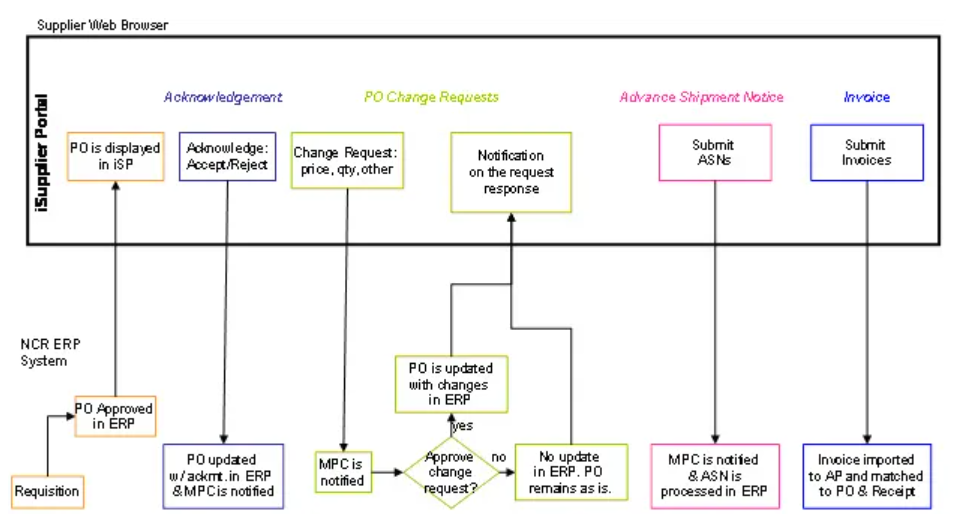
The Internet Supplier Portal (iSP) is a transparent, real-time gateway for our partners. By accessing key business data directly, suppliers can streamline the procure-to-pay cycle and collaborate more effectively with NCR Atleos.
Introduction
Instead of traditional communication methods like phone or mail, iSP provides a single source of truth for both NCR Atleos and its suppliers. This ensures that everyone works with the same real-time data, reducing friction and speeding up essential business transactions.
Portal Capabilities
Submit Transactions
- PO Acknowledgements
- Change and Cancellation Requests
- Advance Shipment Notifications (ASN)
- Invoice Submissions
Account Inquiries
- PO Status and History
- Receipts and Returns
- Invoice Status and Holds
- Payment and Inventory Details
Managing Purchase Orders
Adjustments are often necessary to fulfill an order successfully. iSupplier allows you to request changes to a Purchase Order during the acknowledgment phase or after the order is open.
Requesting Changes
If a PO is awaiting acknowledgment, submit your changes directly within that process. For "Open" POs that have already been acknowledged, use the "Request Changes" button in the portal.
Suppliers can request modifications to the following attributes:
- Promise Date: Update expected delivery timelines.
- Price and Quantity: Adjust financial or inventory volumes.
- Split Shipments: Manage multiple delivery dates for a single order.
- Supplier Part Number: Correct or update internal identifiers.
Download Forms
Step-by-step PDF guides for the Internet Supplier Portal. Each guide walks you through one task, from registering and navigating the portal to managing purchase orders, shipments (ASNs) and invoices.