Applications
NCR Atleos Central is your secure gateway to NCR Atleos applications and tools tailored to your business needs. Applications such as QuoteBuilder and NCR Atleos Download Center can be made available to your account and accessed from the portal once the appropriate access is granted.
Accessing Applications via Widgets
To enable an application, it must first be available to your Account Number. An authorized Account Admin can request access for users, including themselves. Application access may require approval and is not granted simply by submitting a request.
QuoteBuilder Application Widget
This widget allows you to create and manage quotes.
NCR Atleos Download Center Application Widget
Once Download Center access has been granted, use its application widget to open the Download Center and access the software and resources available to your account.

Accessing Applications via Side Navigation
Users can also access their available applications from the Side Navigation menu on the left of the portal screen. Simply click the Applications button from any page to see all applications you currently have access to.

Applications Requiring Additional Information
Some applications require additional information before access can be granted. After the application is assigned or requested, a modal appears if further details are required. Complete the requested information and submit it so the application request can be processed.
Applications available for request depend on those enabled for your organization. Submitting an application request does not automatically grant access.
Complete Your Own Download Center Access Request
You can complete your own Download Center application request, including any additional software-access information requested by the portal. User Administrator permission is not required to complete your own request.
Open your user profile in NCR Atleos Central. Under Related Content, select Applications and locate NCR Atleos Download Center. Open or continue the request from your profile by clicking the grey toggle button and complete the Download Center registration form, including the software titles you need and all required fields. Allow browser pop-ups so the form can open. Submit the completed form.

Submitting the form does not automatically grant Download Center access. Access remains subject to the applicable entitlement and request-processing checks.
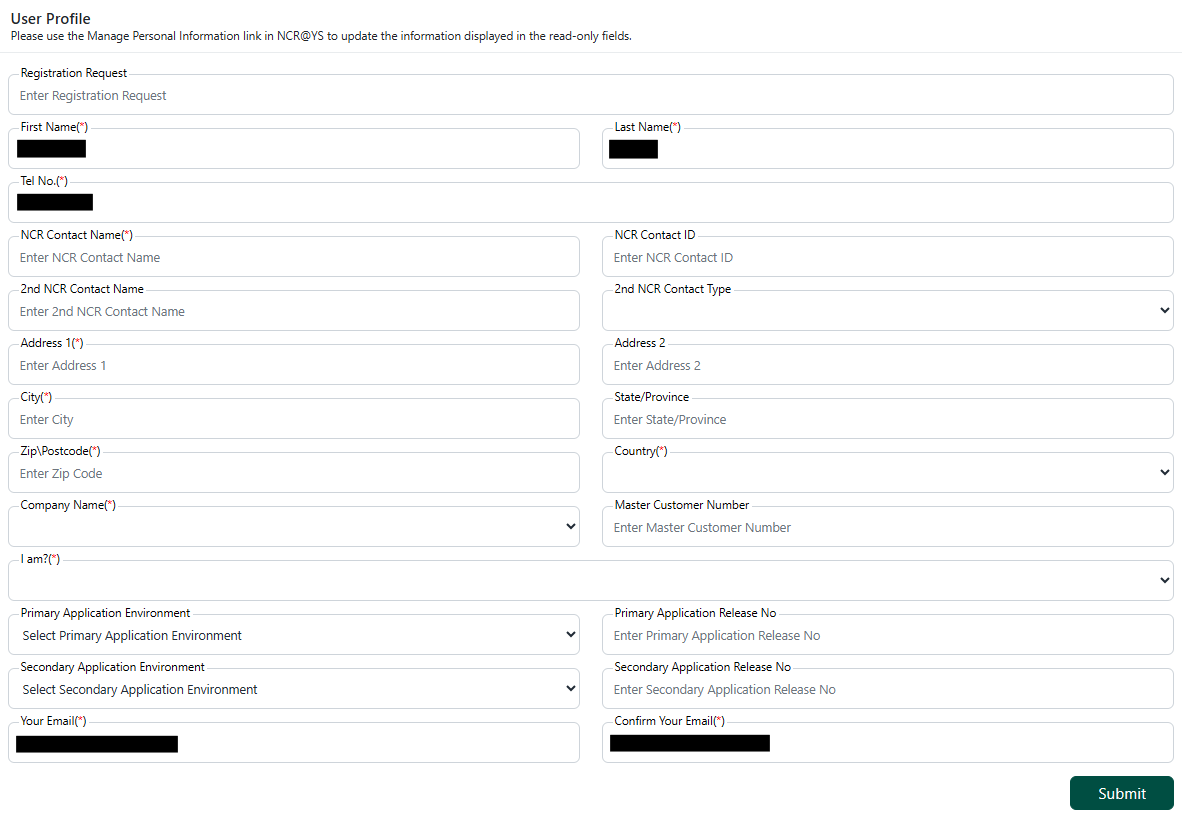
Registration Request form
- First Name / Last Name → Enter your first and last name.
- Tel No. → Enter your telephone number.
- NCR Contact Name → Enter the name of your primary NCR contact.
- NCR Contact ID → Enter your NCR contact's ID, if known.
- 2nd NCR Contact Name / Type → Enter a second NCR contact and select their type, if applicable.
- Address 1 / Address 2 → Enter your business address.
- City / State/Province / Zip/Postcode → Enter your business location details.
- Country → Select your country.
- Company Name → Select your company from the list.
- Master Customer Number → Enter your company's MCN, if known.
- I am? → Select the option that best describes your relationship with NCR, such as Customer of NCR or Distributor/Reseller of NCR.
- Primary Application Environment / Release No. → Select your primary NCR application environment and enter the release number, if applicable.
- Secondary Application Environment / Release No. → Complete these fields only if you use a secondary application environment.
- Your Email / Confirm Your Email → Enter your business email address twice to confirm it.
- Submit the Registration Request once all required fields marked with (*) are complete.
💡 Important: If you are unsure about optional information such as your NCR Contact ID, MCN, application environment, or release number, complete the information you know rather than guessing.
Training, Resources, and Support
Training, resources, and support for each application are provided either on the application’s site or in the approval email when available.
Download Forms
Download the Customer Guide to the NCR Download Center for your region. Each PDF explains how to sign in to the Download Center and find, filter and download the software, updates and documentation available for your NCR Atleos products.